Team Member Guide
Welcome to the team! This guide explains how Valid Email Checker works when you're part of someone else's account. You'll have access to email verification features while the account owner manages billing and credits.
Getting Started
When you're invited to a team, you'll receive an email with:
- A link to sign in
- Your temporary password
Use your email address and the provided password to log in. We recommend changing your password after your first login.
What You Have Access To
As a team member, you can use most of Valid Email Checker's features:
| Feature | Access |
|---|---|
| Single email verification | ✅ Yes |
| Bulk list upload | ✅ Yes |
| Download results | ✅ Yes |
| Credits History | ✅ Yes |
| Profile settings | ✅ Yes |
| Security settings | ✅ Yes |
| Integrations | ✅ Yes |
You can verify emails exactly like the account owner - there's no difference in functionality.
What You Don't Have Access To
Some features are restricted to the account owner:
| Feature | Access |
|---|---|
| Billing & Payments | ❌ No |
| Invoices | ❌ No |
| Buy credits | ❌ No |
| API access | ❌ No |
| Auto-refill settings | ❌ No |
| Invite team members | ❌ No |
| Manage team members | ❌ No |
You won't see these tabs in your Account Settings - they're simply not visible to team members.
Your Team Dashboard
When you go to Account Settings > Team, you'll see your Team Member Dashboard.
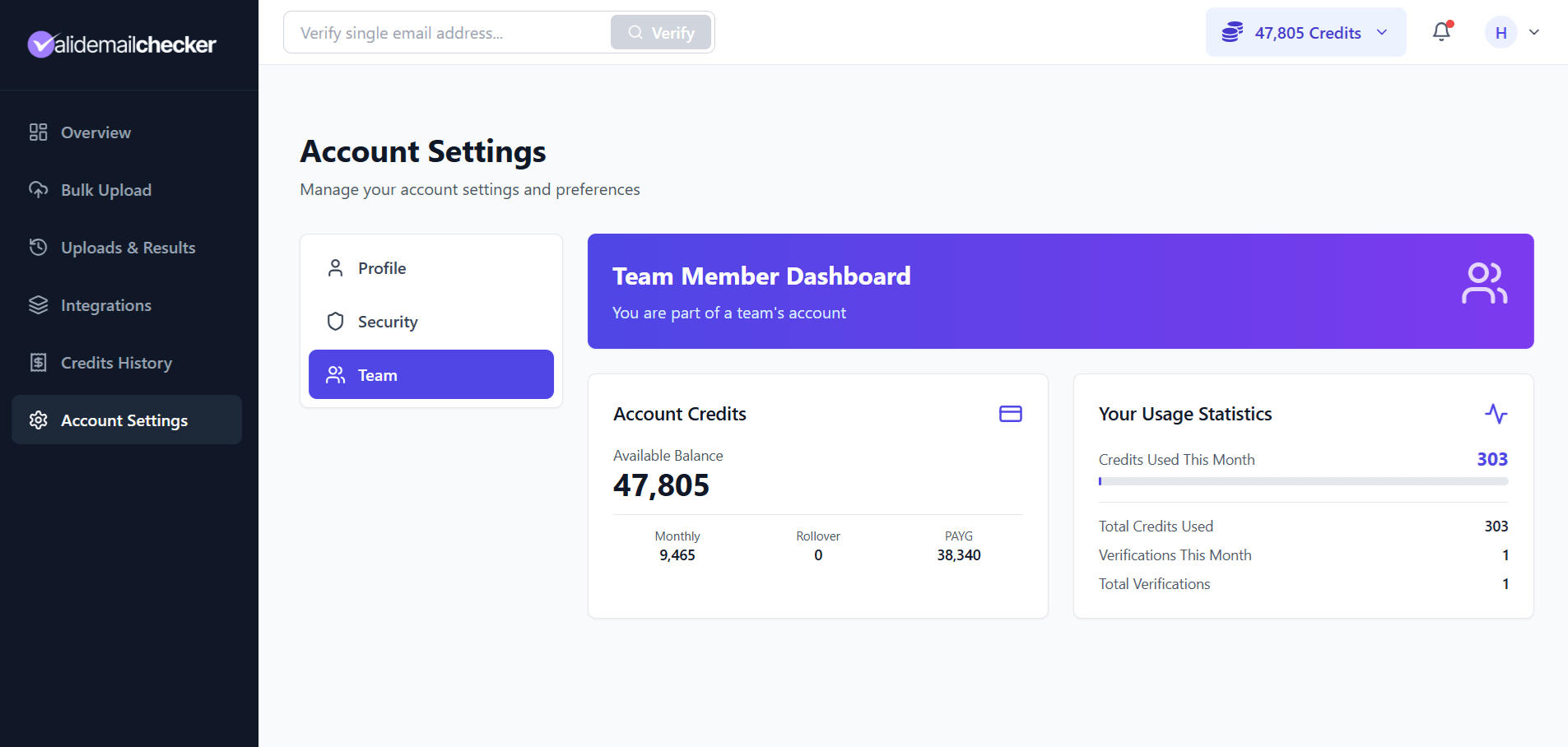
Account Credits
This shows the shared credit balance for the entire team:
- Available Balance - Total credits available
- Monthly - Credits from the subscription
- Rollover - Unused credits from last month
- PAYG - Pay-as-you-go credits
These are shared credits. When you verify emails, credits are deducted from this shared pool.
Your Usage Statistics
Track your personal contribution:
| Stat | Description |
|---|---|
| Credits Used This Month | Your credit usage this billing period |
| Total Credits Used | Your all-time credit usage |
| Verifications This Month | Number of verification jobs this month |
| Total Verifications | Your all-time verification count |
The account owner can see your usage, so they know how credits are being used across the team.
Using Shared Credits
When you verify emails:
- Credits are deducted from the shared pool
- Your personal usage counter increases
- The verification appears in your Uploads & Results
- Results are associated with your account
There's no separate credit allocation per team member - everyone draws from the same pool.
Your Profile & Security
You have full control over your own account settings:
Profile Settings
- Update your name
- Add phone number
- Set your address
- Configure notification preferences
Note: Some notification options (like payment receipts and low balance alerts) aren't available to team members since you don't manage billing.
Security Settings
- Change your password
- Enable two-factor authentication
- View your active sessions
We recommend enabling 2FA to keep your access secure.
If You Get Suspended
The account owner can temporarily suspend your access. If this happens:
- You'll receive an email notification
- You won't be able to log in
- Your data and history are preserved
Contact the account owner if you believe this was a mistake. Once they reactivate your account, you can log in with your same credentials.
If You Get Removed
If the account owner removes you from the team:
- You'll receive an email notification
- You won't be able to log in
- You'll need a new invitation to rejoin
Removal is permanent. If you need access again, ask the account owner to send a new invitation.
Running Low on Credits?
Since you can't purchase credits yourself, let the account owner know when the balance is getting low. They can:
- Buy more PAYG credits
- Upgrade the subscription
- Enable auto-refill
Good communication helps ensure the team never runs out of credits mid-project.
Common Questions
Can I see other team members?
No. You can only see your own usage. The team member list is only visible to the account owner.
Can I invite others to the team?
No. Only the account owner can invite new team members.
What happens to my verifications if I'm removed?
Your verification results stay in the account. The account owner retains access to all data.
Can I export my verification history?
Yes. You can download results for any verifications you've run, just like normal.
Who do I contact for billing questions?
Contact the account owner. They manage all billing, invoices, and credit purchases.
Can I create my own account later?
Yes. If you later want your own independent account, you can sign up with a different email address. You won't be able to use the same email that's part of a team.
Quick Reference
| I want to... | Where to go |
|---|---|
| Verify a single email | Dashboard or top search bar |
| Upload a bulk list | Bulk Upload |
| See my results | Uploads & Results |
| Check credit balance | Team tab or header |
| See my usage | Account Settings > Team |
| Change my password | Account Settings > Security |
| Set up 2FA | Account Settings > Security |
Need Help?
If you have questions about the platform:
- Help Center - You're here! Browse the guides.
- Live Chat - Click "Need help?" in the bottom-right corner
- Email - support@validemailchecker.com
For questions about your team account, billing, or credits, contact your account owner directly.