Cancel Subscription
Need to cancel? No problem. When you cancel, you keep full access until your current billing period ends. No immediate cutoff, no lost credits.
How Cancellation Works
Valid Email Checker uses a grace period model for cancellations:
- Cancel anytime - No fees, no penalties
- Keep full access - Until your current period ends
- Credits remain available - Use them until expiration
- No future charges - Your card won't be billed again
- Reactivate anytime - Change your mind before period ends
How to Cancel
- Go to Account Settings in the sidebar
- Select Billing & Payments
- Click Cancel Subscription
- Review what happens when you cancel
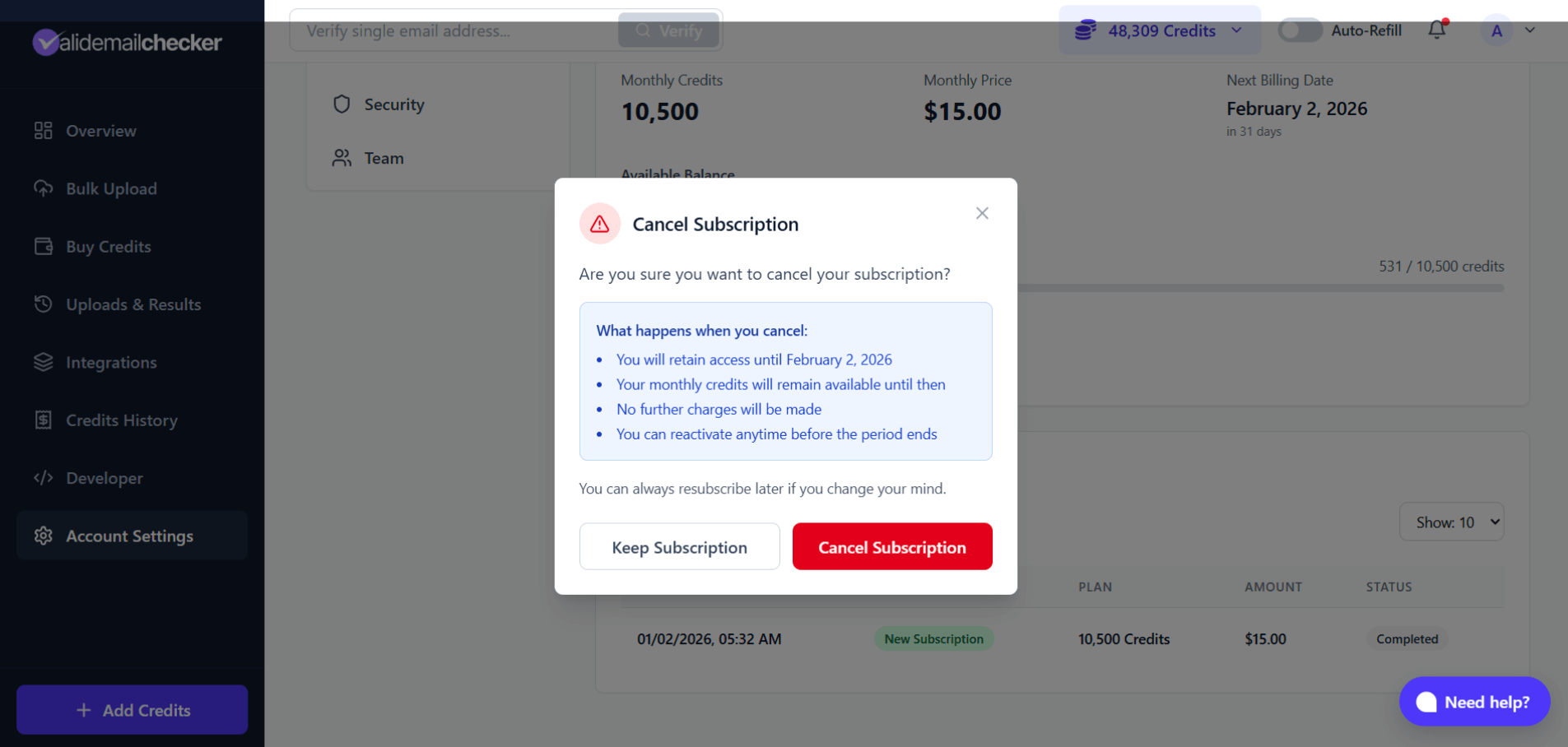
The modal explains:
- When your access ends (your next billing date)
- Your credits remain available until then
- No further charges will be made
- You can reactivate anytime before the period ends
- Click Cancel Subscription to confirm
What Happens After Cancellation
Immediately
- Your subscription status changes to "Ending Soon"
- A grace period begins (until your next billing date)
- Any scheduled downgrade is cancelled
- No charge is made
During Grace Period
- Full access to all features
- Your monthly and rollover credits remain available
- You can verify emails as normal
- You can reactivate at any time
When Grace Period Ends
- Subscription status changes to "Expired"
- Monthly credits expire
- Rollover credits expire
- No renewal charge
- PAYG credits remain (they never expire)
What Happens to Your Credits
| Credit Type | During Grace Period | After Expiration |
|---|---|---|
| Monthly | Available | Expire |
| Rollover | Available | Expire |
| PAYG | Available | Keep forever |
Your pay-as-you-go credits are never affected by subscription status. They remain in your account indefinitely.
The Grace Period
The grace period is the time between when you cancel and when your subscription actually expires.
Example:
- Billing date: February 2, 2026
- You cancel: January 15, 2026
- Grace period: January 15 - February 2 (18 days)
- Full access until: February 2, 2026
During this time, you have full access to everything. Use your remaining credits, download your results, and take your time deciding if cancellation is right for you.
Reactivating Your Subscription
Changed your mind? You can reactivate anytime during the grace period.
To reactivate:
- Go to Account Settings > Billing & Payments
- Click Reactivate Subscription
- Confirm reactivation
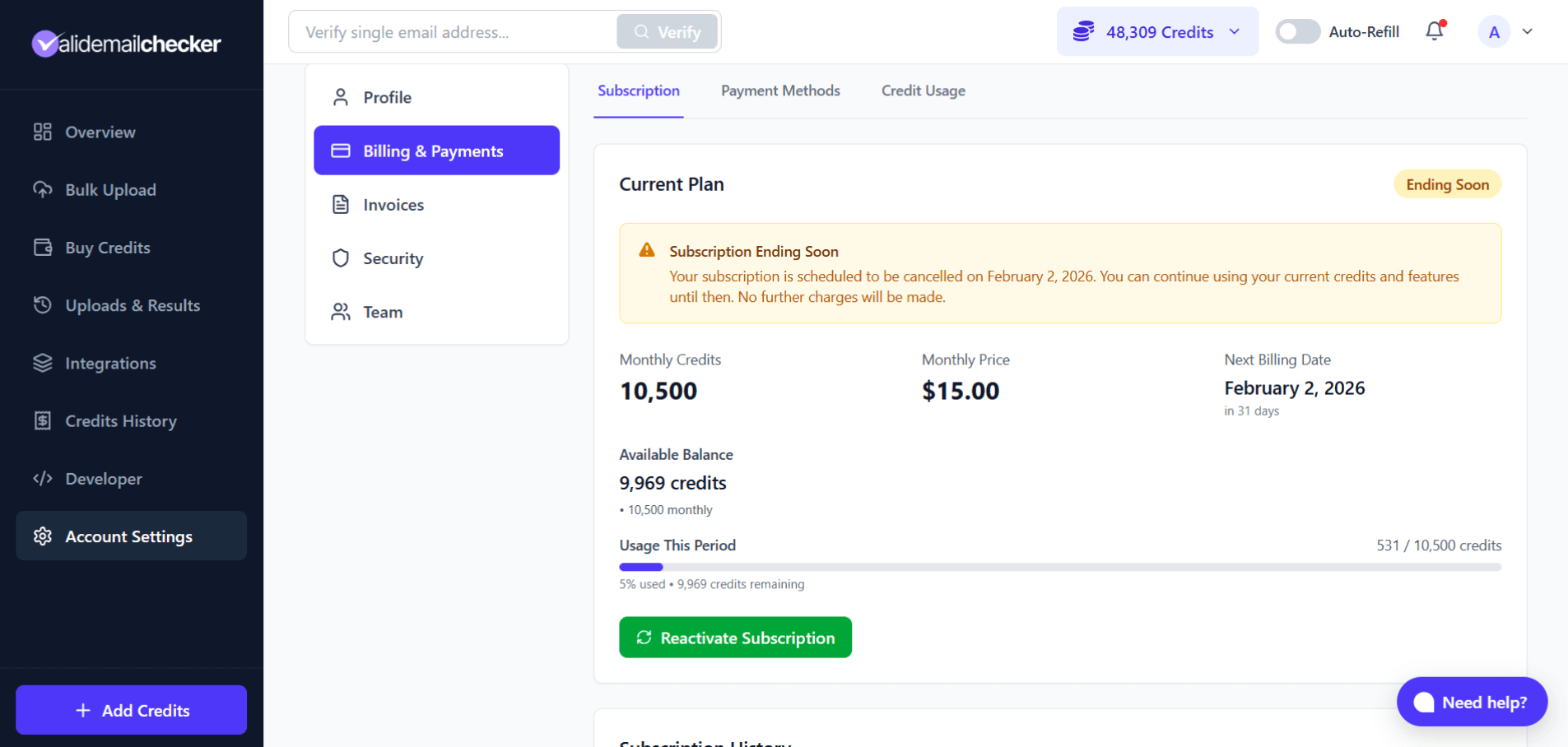
Your subscription continues as if you never cancelled:
- Same plan
- Same billing date
- Same credits
- Normal renewal will occur at period end
After Grace Period Ends
Once your subscription expires, you can't reactivate - you'll need to subscribe again as a new subscription. Your PAYG credits will still be there, but you'll start fresh with monthly credits.
Cancel vs Downgrade
Not sure which option is right?
| Cancel | Downgrade |
|---|---|
| Stop subscription completely | Keep subscription at lower cost |
| No more monthly credits | Smaller monthly credit allocation |
| Lose rollover benefits | Keep rollover benefits |
| No more charges | Lower monthly charge |
| Keep PAYG credits only | Keep all credit types |
Choose Cancel if:
- You no longer need email verification
- You want to take a break
- You have enough PAYG credits to last a while
Choose Downgrade if:
- You still need credits, just fewer
- You want to maintain rollover benefits
- You prefer predictable monthly billing
Before You Cancel
Use Your Credits
Your monthly and rollover credits will expire when the grace period ends. Consider using them before cancelling, or at least during the grace period.
Download Your Results
Make sure you've downloaded all verification results you need. Your upload history remains accessible, but it's good practice to save important data.
Consider Alternatives
- Downgrade - Keep a smaller subscription
- Pause usage - Just don't verify emails for a while (credits roll over)
- Buy PAYG - One-time purchase, no subscription needed
Common Questions
Will I be charged when I cancel?
No. Cancellation is free. You've already paid for your current period, and no additional charges will be made.
Can I get a refund for unused time?
No. When you cancel, you keep access until your period ends. There are no partial refunds, but you don't lose any time you've paid for either.
What if I cancel by mistake?
Reactivate during the grace period. Go to your subscription settings and click Reactivate. Your subscription will continue normally.
Can I cancel and then subscribe to a different plan?
Yes, but it's easier to just upgrade or downgrade. If you cancel and resubscribe, you'll start a new subscription rather than continuing your existing one.
Will I lose my verification history?
No. Your account, upload history, and results remain accessible even after cancellation. Only your monthly and rollover credits expire.
What happens to my team members?
Team members lose access to shared credits when your subscription expires. They'll need their own credits or subscription to continue verifying.
Can I cancel during the trial/free credits period?
There's no trial to cancel. Free signup credits are PAYG credits and don't involve a subscription. You only have a subscription if you purchased a monthly plan.
After Cancellation
Even after your subscription expires:
- Your account remains active - Log in anytime
- PAYG credits are available - Use them whenever
- Verification history is preserved - Access past results
- You can resubscribe - Start a new subscription anytime
Cancelling doesn't delete your account. You're always welcome back.
Quick Reference
| Question | Answer |
|---|---|
| When does cancellation take effect? | End of current billing period |
| Do I lose access immediately? | No - grace period until period ends |
| Are there cancellation fees? | No |
| Can I reactivate? | Yes, during grace period |
| What credits do I keep? | PAYG only (after expiration) |
| Can I resubscribe later? | Yes, anytime |
Next Steps
-> Managing Your Subscription - View your subscription status
-> Pricing & Bonus Credits - If you want to buy PAYG credits instead
-> Downgrade Your Plan - If you'd rather keep a smaller subscription