Upgrade Your Plan
Need more credits? Upgrading your subscription takes effect immediately, and you only pay the difference based on your unused credits.
How Upgrades Work
When you upgrade:
- Immediate effect - New plan activates right away
- Prorated billing - You pay the difference, not full price
- Credits replaced - New plan credits replace your current allocation
- Billing cycle resets - Your next renewal is 30 days from the upgrade
Prorated Billing Explained
You don't pay full price when you upgrade mid-cycle. Instead, we calculate the value of your unused credits and subtract it from the new plan price.
The Formula
Unused Credit Value = (Current Balance / Plan Credits) x Plan Price
Amount Due = New Plan Price - Unused Credit Value
Example
You're on the 10,500 credit plan at $15/month.
- You've used 5,250 credits (50%)
- You have 5,250 credits remaining
- Unused value: (5,250 / 10,500) x $15 = $7.50
You want to upgrade to the 52,500 credit plan at $55/month.
- New plan price: $55.00
- Your credit value: -$7.50
- Amount due: $47.50
You pay $47.50 today, get 52,500 fresh credits, and your next billing date is 30 days from now.
How to Upgrade
- Go to Buy Credits in the sidebar
- Select the Monthly Plans tab
- Choose a plan higher than your current one
- You'll see "Upgrade: Pay the difference today" below the price
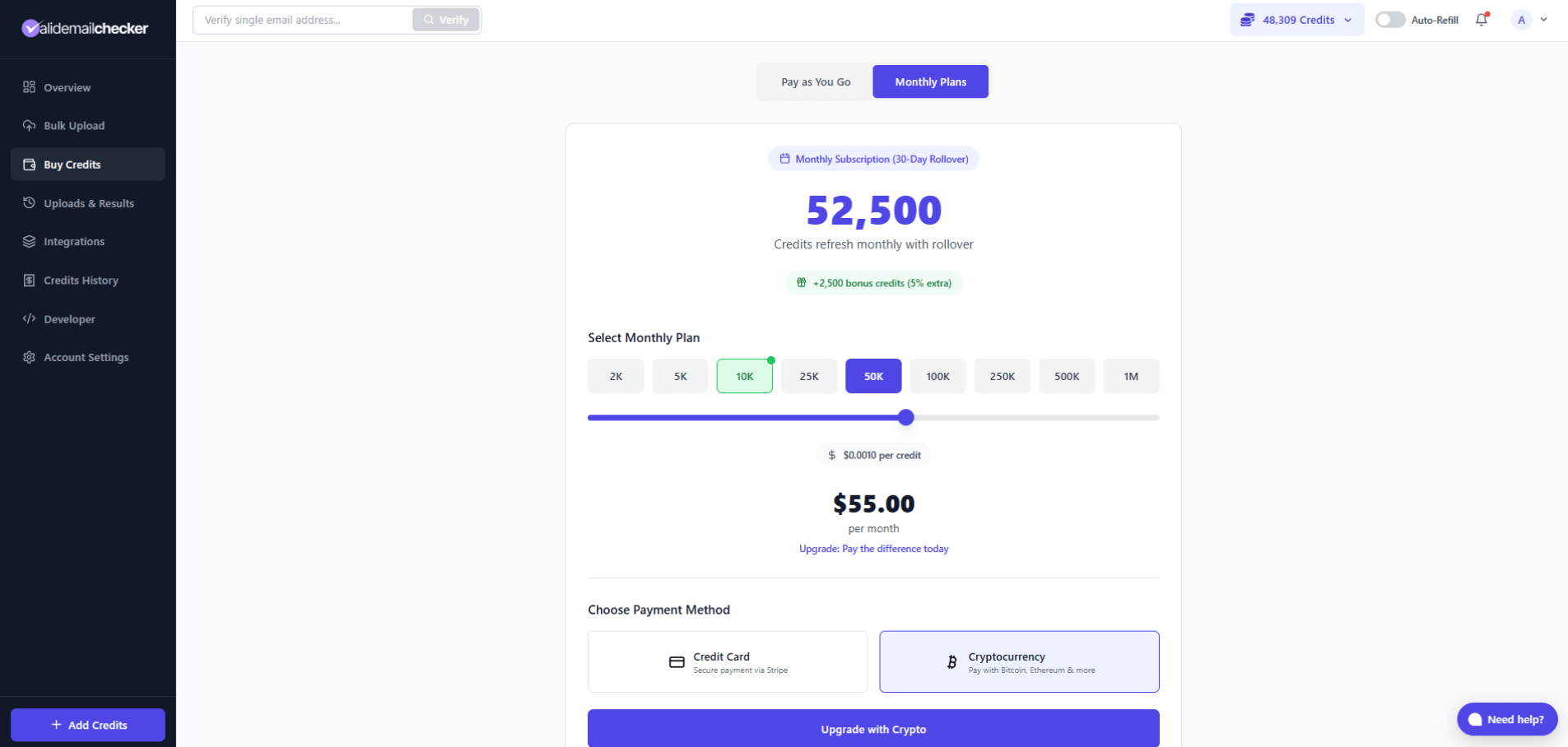
- Select your payment method (Credit Card or Cryptocurrency)
- Click the upgrade button
- Review the Upgrade Preview modal
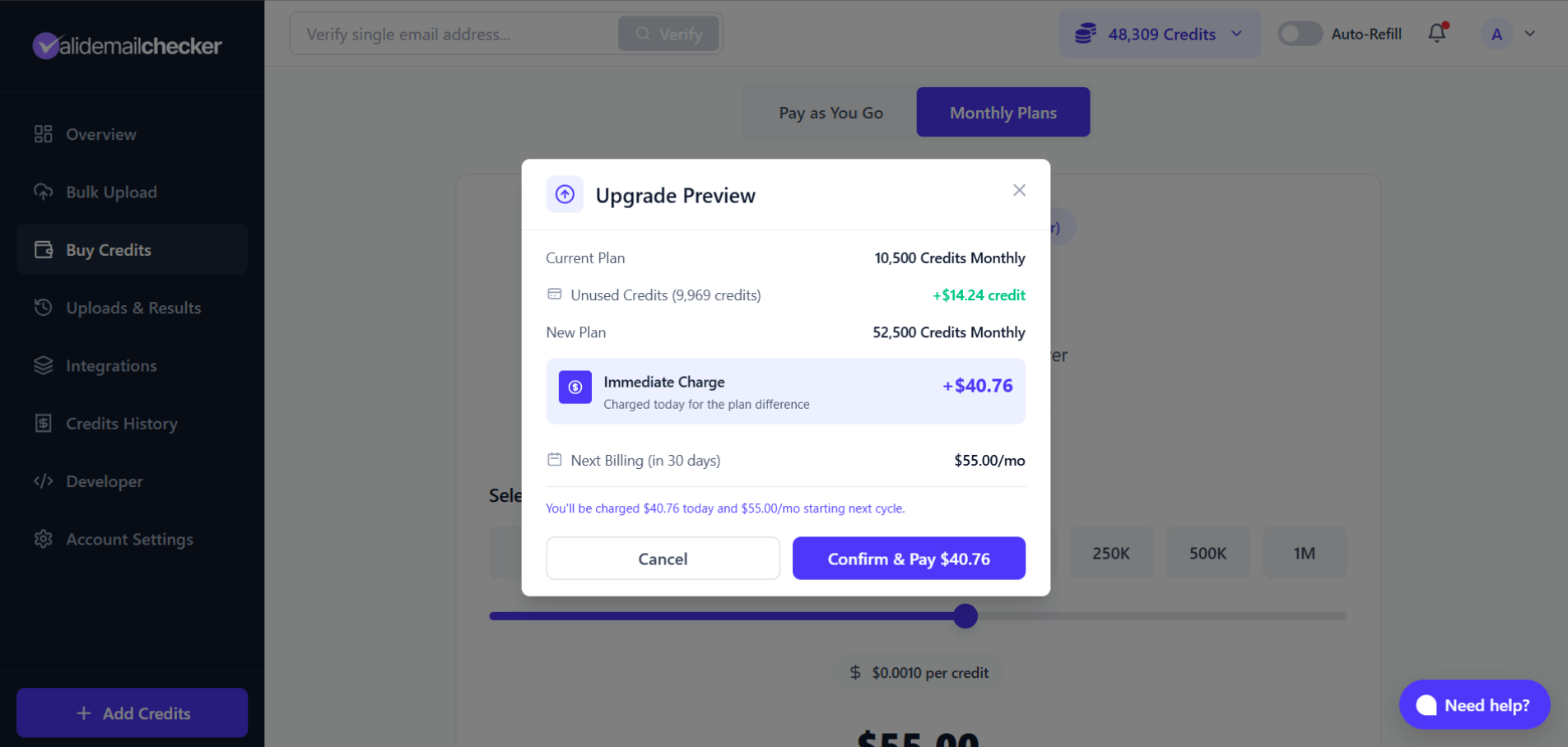
The preview shows:
- Your current plan
- Unused credits and their dollar value
- New plan details
- Immediate charge amount
- Next billing amount
- Click Confirm & Pay to complete the upgrade
Your new credits are available immediately after payment.
What Happens to Your Credits
Current Monthly Credits
Your current monthly credits are replaced by the new plan's credits. The value of unused credits is refunded through proration (you pay less for the upgrade).
Rollover Credits
Any rollover credits from your previous period remain in your account. They're not affected by the upgrade.
PAYG Credits
Pay-as-you-go credits are separate and unaffected. They stay in your account.
Billing Cycle Reset
When you upgrade, your billing cycle resets to 30 days from the upgrade date.
Example:
- Original renewal: January 15
- Upgrade on January 5
- New renewal: February 4 (30 days from upgrade)
This ensures you get a full 30 days to use your new, larger credit allocation.
Payment Methods
You can pay for upgrades with:
- Credit Card - Secure payment via Stripe
- Cryptocurrency - Bitcoin, Ethereum, and more
If you have a saved card, the upgrade can process immediately without going through checkout.
Upgrading a Cancelled Subscription
If you cancelled your subscription but are still in the grace period, upgrading will:
- Reactivate your subscription
- Clear the cancellation
- Start you on the new, higher plan
This is a quick way to both reactivate and upgrade in one step.
Upgrading with a Pending Downgrade
If you previously scheduled a downgrade, upgrading will:
- Cancel the scheduled downgrade
- Apply the upgrade immediately
- Set you on the new, higher plan
The pending downgrade is automatically cleared.
Tips for Upgrading
Time It Right
If you've used most of your credits, you'll get less proration credit. Consider:
- Upgrading early in your cycle = more unused credit value
- Upgrading late = less credit value, but you used what you paid for
Choose the Right Size
Look at your usage patterns. If you consistently run out of credits, consider jumping up more than one tier to avoid upgrading again soon.
Check Your Usage First
Go to Account Settings > Billing & Payments > Credit Usage to see your typical monthly usage before deciding on a plan size.
Common Questions
Do I lose my unused credits?
No. The value of your unused credits is calculated and subtracted from the upgrade price. You're essentially getting credit for what you haven't used.
When do I get the new credits?
Immediately after payment completes. There's no waiting period.
What if I upgrade multiple times in one month?
The system protects against billing cycle manipulation. If you upgrade multiple times within 25 days, your billing cycle may be preserved rather than reset each time.
Can I upgrade with crypto?
Yes. Select Cryptocurrency as your payment method and complete the payment through our crypto payment partner.
Will my rollover credits be affected?
No. Rollover credits from your previous period stay in your account. Only your monthly allocation changes.
What if I change my mind after upgrading?
You can downgrade your plan, but it won't take effect until your next renewal. There are no refunds for the current period, but you keep the higher credits until then.
Quick Reference
| Aspect | What Happens |
|---|---|
| When it takes effect | Immediately |
| Payment | Prorated (pay the difference) |
| Current credits | Value credited toward upgrade |
| New credits | Full new plan allocation |
| Billing cycle | Resets to 30 days from upgrade |
| Rollover credits | Unaffected |
| PAYG credits | Unaffected |
| Pending downgrade | Cancelled |
| Cancelled subscription | Reactivated |
Next Steps
-> Downgrade Your Plan - Reduce your plan at next renewal
-> Managing Your Subscription - View your current plan
-> Pricing & Bonus Credits - Compare all plan options