Single Email Verification
Need to check just one email address? You don't have to upload a file.
Valid Email Checker lets you verify individual emails instantly—right from your dashboard. Type an email, click verify, and get detailed results in seconds.
Let's walk through it.
When to Use Single Verification
Single verification is perfect for:
- Quick checks — "Is this email legit before I reply?"
- Lead qualification — Verify a prospect before adding to your CRM
- Form submissions — Someone just signed up—is it real?
- Bounce investigation — "Why did this email bounce? Let me check it"
- Testing — Verify your own email to see how the system works
If you have more than a handful of emails to verify, bulk verification is more efficient. But for one-off checks, single verification is your go-to.
How to Verify a Single Email
Step 1: Find the Verification Bar
Log into your dashboard. At the very top of the page, you'll see a search bar that says "Verify single email address..."
It's always there, on every page—so you can verify an email anytime without navigating anywhere.
Step 2: Enter the Email Address
Click the verification bar and type (or paste) the email address you want to verify.
Examples:
milaw42122@emaxasp.com
contact@company.com
suspicious-lead@unknown-domain.net
Step 3: Click Verify
Hit the Verify button (or press Enter).
The verification runs immediately. In most cases, you'll have results within 2-5 seconds.
Step 4: View Your Results
A popup appears with your verification results:
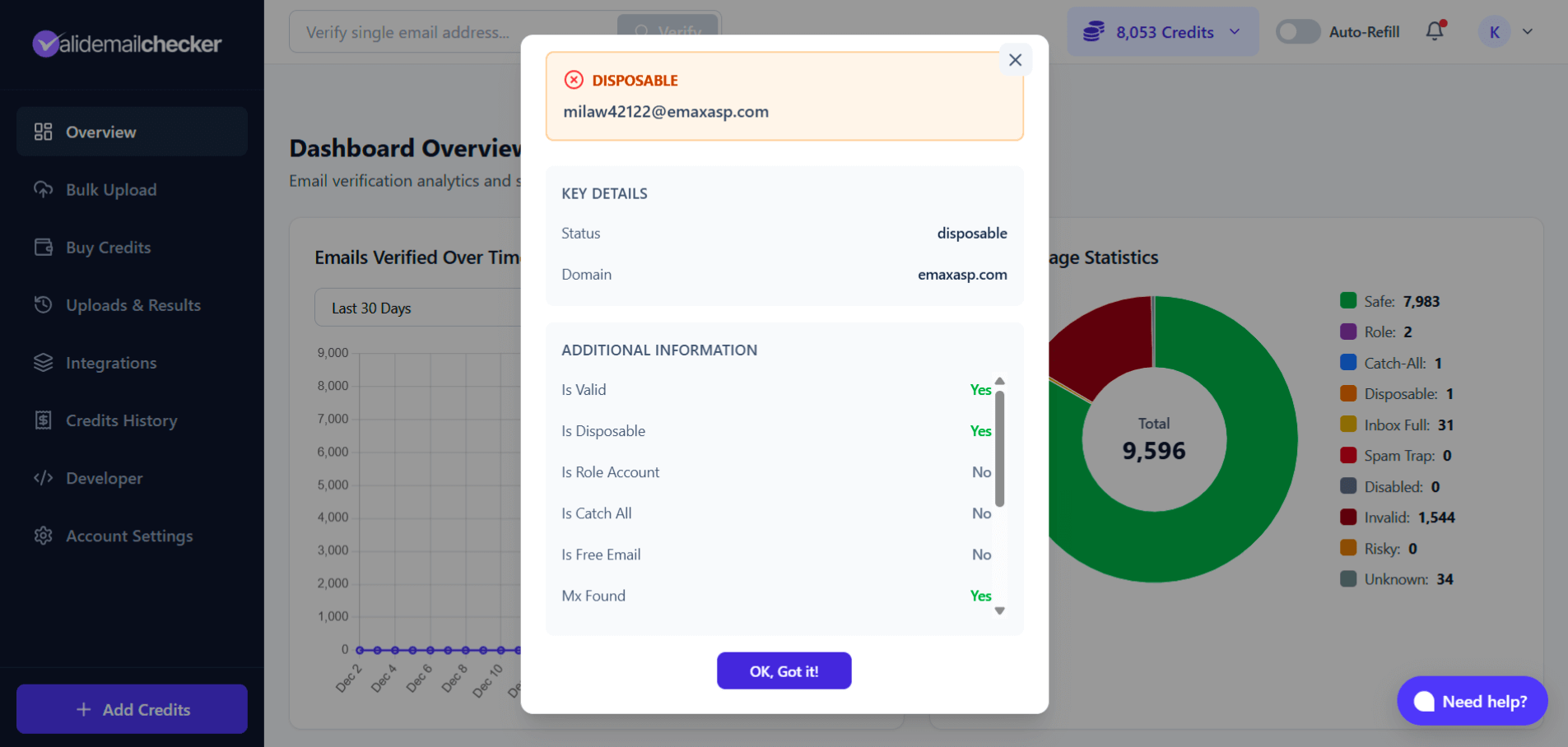
Example: A disposable email detected by Valid Email Checker
That's it! Four steps, a few seconds, one verified email.
Understanding the Results
The results popup gives you everything you need to know about that email address.
Key Details
| Field | What It Shows |
|---|---|
| Status | The verification result (Safe, Invalid, Disposable, etc.) |
| Domain | The email's domain (gmail.com, company.com, etc.) |
The status appears at the top with a color-coded header:
- 🟢 Green — Safe (send confidently)
- 🔵 Blue — Valid
- 🟣 Purple — Role Account (team emails)
- 🟤 Indigo — Catch-All (proceed with caution)
- 🟡 Yellow — Inbox Full (retry later)
- 🟠 Orange — Disposable, Risky (don't send)
- 🔴 Red — Invalid, Spam Trap (never send)
- ⚫ Gray — Disabled, Unknown
Additional Information
Scroll down in the popup to see detailed verification data:
| Field | What It Means |
|---|---|
| Is Valid | Does the email address exist? |
| Is Disposable | Is this a temporary/throwaway email? |
| Is Role Account | Is this a team email (info@, support@)? |
| Is Catch All | Does the server accept all emails? |
| Is Free Email | Gmail, Yahoo, Outlook, etc.? |
| MX Found | Does the domain have mail servers configured? |
| Risk Score | How risky is this email? (0 = safe, 100 = risky) |
| Deliverability | High, Medium, or Low chance of delivery |
| Credits Used | How many credits this verification cost (always 1) |
| Verified At | Timestamp of when the verification ran |
| Reason | Brief explanation of the result |
Understanding Risk Score
The Risk Score tells you how risky it is to send to this email:
| Risk Score | Meaning |
|---|---|
| 0-10 | Very safe—send confidently |
| 10-30 | Safe—go ahead |
| 30-70 | Moderate risk—proceed with caution |
| 70-100 | High risk—probably shouldn't send |
Lower is better. A Safe email has a risk score around 2. A Disposable email has a risk score around 70.
In the Result Types article, we mention status scores (Safe = 98, Disposable = 30). The Risk Score is simply the inverse: Risk Score = 100 - Status Score. So a Disposable email with status score 30 shows Risk Score 70.
What Each Status Means
Here's a quick refresher on what the status tells you:
| Status | What to Do |
|---|---|
| Safe | ✅ Send confidently |
| Role | ✅ Send (but expect lower engagement) |
| Catch-All | ⚠️ Can send, but delivery uncertain |
| Disposable | ❌ Don't send—it's a throwaway address |
| Inbox Full | ⚠️ Try again later |
| Invalid | ❌ Don't send—it will bounce |
| Disabled | ❌ Don't send—account deactivated |
| Spam Trap | 🚫 Never send—honeypot address |
| Unknown | ⚠️ Couldn't verify—retry or skip |
→ Full explanation of all result types
How Much Does It Cost?
1 credit per verification.
Same as bulk verification—no premium for the convenience of single checks.
If the result is Unknown (we couldn't verify), your credit is automatically refunded.
Single vs. Bulk: Which Should I Use?
| Scenario | Best Option |
|---|---|
| Checking 1-5 emails | ✅ Single verification |
| Verifying a new lead before calling | ✅ Single verification |
| Testing the service | ✅ Single verification |
| Cleaning a list of 50+ emails | ✅ Bulk verification |
| Regular list maintenance | ✅ Bulk verification |
| Importing contacts to CRM | ✅ Bulk verification |
Rule of thumb: If you're verifying more than 10 emails, bulk upload will save you time. For quick one-off checks, single verification is faster.
Common Use Cases
"Is this lead real?"
You just got a form submission from john.smith.12345@gmail.com. Before your sales team reaches out, verify it:
- Paste the email in the verification bar
- Click Verify
- Status shows Safe → Great, it's a real person!
- Status shows Disposable → They used a fake email—probably not a serious lead
"Why did my email bounce?"
A message to contact@some-company.com bounced. What happened?
- Verify the email
- Status shows Invalid → The address doesn't exist (maybe they gave you the wrong email?)
- Status shows Catch-All → The server accepts everything, so it shouldn't have bounced—might be a content or reputation issue on your end
"Should I trust this signup?"
Someone registered on your platform with temp123@guerrillamail.org. Suspicious?
- Verify it
- Status shows Disposable → Yep, it's a throwaway. They probably won't engage.
- Consider: Do you want users with fake emails in your system?
"Does my own email work?"
Want to see how Valid Email Checker works? Verify your own email:
- Type your email address
- Click Verify
- You should see Safe (unless you're using a temporary email 😉)
For Developers: API Single Verification
Need to verify emails programmatically? We've got you covered.
Our API lets you verify single emails in real-time—perfect for:
- Form validation at signup
- Lead enrichment workflows
- CRM integrations
- Custom applications
Quick example:
curl -X POST https://app.validemailchecker.com/api/verify-single \
  -H "Authorization: Bearer YOUR_API_KEY" \
  -H "Content-Type: application/json" \
  -d '{"email": "user@example.com"}'
The API returns the same detailed data you see in the dashboard popup.
API access is enabled after your first credit purchase. Free credits work in the dashboard but not via API.
Tips for Single Verification
Copy-paste carefully Extra spaces before or after an email can cause issues. Double-check what you pasted.
Check for typos first If an email shows as Invalid, look for common typos:
gmial.com→gmail.comyaho.com→yahoo.comhotmal.com→hotmail.com
Verify before important outreach Sending a critical proposal? Verify the recipient's email first. A bounced email on an important message is embarrassing (and might cost you the deal).
Use it for quality control Spot-check emails from your bulk results. If something looks suspicious, run a quick single verification to see the full details.
Quick Recap
| What | Details |
|---|---|
| Where | Verification bar at the top of your dashboard |
| How | Type email → Click Verify → View popup results |
| Speed | 1-2 seconds |
| Cost | 1 credit per verification |
| Results | Status, risk score, deliverability, detailed flags |
| Best for | Quick checks, lead qualification, testing |
Next Steps
Now that you know how to verify single emails: